

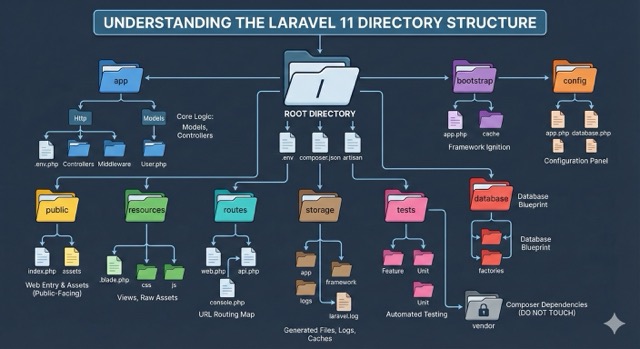
When you first open a new Laravel project, it can feel like walking into a massive library without a map. There are folders everywhere—app, bootstrap, vendor, public—and files with names that sound important but obscure, like composer.json or artisan.
For a beginner, this is often the most intimidated moment. But here is the secret: Laravel’s structure is not accidental; it is intentional. Every folder has a distinct personality and a specific job. Once you understand the “why” behind each directory, the framework stops feeling like a maze and starts feeling like a well-organized workshop where every tool is exactly where it belongs.
In this guide, we are going to deconstruct the Laravel directory structure. We will walk through the application layer by layer, explaining not just what goes where, but how these directories interact to power your web application.
1. The Root Directory: The Foundation
Before we dive into the subfolders, look at the files sitting in the root of your project. These are the gatekeepers of your application.
-
.env: This is your environment configuration file. It holds sensitive data like database passwords, API keys, and debug settings. Think of this as the “settings” menu for your server. It is never committed to version control (Git) because it is unique to the machine it is running on. -
composer.json: This is the recipe book for your project. It tells PHP which external packages (dependencies) your application needs to run. When you runcomposer install, this file dictates exactly what gets downloaded. -
artisan: You will use this file constantly, but you will never open it. This is the command-line interface script that allows you to run commands likephp artisan migrateorphp artisan make:controller.
2. The app Directory: The Brains of the Operation
The app folder is where you will spend 90% of your coding time. It houses the core logic of your application. In Laravel 11, this directory has been significantly streamlined to be less cluttered.
Models
Located at app/Models, this is where your database entities live. A “Model” is a PHP class that represents a table in your database.
-
Example: A
User.phpmodel represents youruserstable. -
Why it matters: Instead of writing raw SQL queries like
SELECT * FROM users, you can simply writeUser::all().
Http
This folder handles the request-response cycle. If the Models folder is the memory, Http is the voice and ears.
-
Controllers: These are the traffic cops. When a user visits a URL (like/profile), a Controller decides what to do. It might ask a Model for data and then send it to a View to be displayed. -
Middleware: Think of these as security guards. They inspect requests before they reach your controller. For example, theAuthenticatemiddleware checks if a user is logged in. If not, it redirects them to the login page before the controller even knows they tried to access the page.
Note for Upgraders: In older versions of Laravel (10 and below), you might be looking for a
Consolefolder or anExceptionsfolder here. In Laravel 11, these have been moved or consolidated to keep the structure cleaner.
3. The bootstrap Directory: The Ignition
Many developers ignore this folder, but it is critical.
-
app.php: In Laravel 11, this file became very important. It is where you now configure your routing, middleware, and exception handling. It effectively replaces the oldKernel.phpfiles. -
cache: This folder holds framework-generated files that speed up performance. You generally should not touch files here; let Laravel manage them.
4. The config Directory: The Control Panel
As the name suggests, this folder contains all your application’s configuration files.
-
app.php: General settings like your application name, timezone, and locale. -
database.php: Defines your database connections (MySQL, SQLite, Postgres). -
filesystems.php: Configures where you store files (local disk, Amazon S3, etc.).
Best Practice: You typically rarely need to edit these files directly. Instead, you should change the values in your .env file, which these config files reference. For example, database.php looks for env('DB_HOST').
5. The database Directory: The Data Blueprint
This directory is unique because it doesn’t hold the live data, but rather the structure and seed of your data.
-
migrations: These are version control for your database. A migration file describes a change to your database schema (like “create a users table” or “add a phone_number column”). By runningphp artisan migrate, you can sync your database structure across your entire team. -
seeders: These are scripts that populate your database with dummy data. This is incredibly useful for testing. You can write a seeder that creates 10 fake users so you don’t have to manually register them every time you reset your database. -
factories: These work with seeders to generate fake data. A factory defines how to create a fake user (e.g., “use a random name and a random email”).
6. The public Directory: The Front Door
This is the only directory that should be accessible to the web. When you configure your web server (Nginx or Apache), you point the “document root” here.
-
index.php: This is the entry point for every single request entering your application. It initializes the framework and directs the request to the router. -
Assets: This is where you place public-facing files like
robots.txt,favicon.ico, and images that don’t need to be processed.
7. The resources Directory: The Presentation Layer
If app is the logic, resources is the look and feel.
-
views: This contains your HTML templates. Laravel uses a templating engine called Blade (files end in.blade.php). Blade allows you to use PHP variables and logic inside your HTML cleanly. -
css&js: This is where your uncompiled assets live. If you are using a tool like Vite (default in modern Laravel) or Tailwind CSS, you write your code here. When you build your application, these files are compiled and optimized versions are placed in thepublicfolder.
8. The routes Directory: The Map
This directory defines how URLs map to your code.
-
web.php: This is the most used file. It defines routes for your web interface (pages users see in a browser). These routes have features like Session state and CSRF protection enabled by default. -
api.php: (Installable in Laravel 11) Used for API routes if you are building a backend for a mobile app or a JavaScript frontend (like React or Vue). These routes are stateless and typically use token authentication. -
console.php: Here you can define custom Closure-based Artisan commands.
9. The storage Directory: The Filing Cabinet
This is where Laravel stores generated files. It is divided into three main sub-folders:
-
app: Used to store files generated by your application (like user-uploaded avatars or invoices). -
framework: Used by Laravel for internal storage (caches, file-based sessions, and compiled views). -
logs: Contains thelaravel.logfile. If your app crashes, this is the first place you should look to see the error details.
Crucial detail: The storage folder must be writable by the web server. If you see a “Permission Denied” error when deploying, it’s usually this folder.
10. The tests Directory: The Safety Net
Laravel is built with testing in mind.
-
Feature: These tests simulate a user clicking through your application (e.g., “Can a user visit the /login page and successfully log in?”). -
Unit: These tests check small, isolated pieces of logic (e.g., “Does this function correctly calculate the tax on a product?”).
11. The vendor Directory: The “Do Not Touch” Zone
This folder contains all the third-party libraries installed by Composer (including the Laravel framework code itself).
Rule of Thumb: Never, ever edit files inside the vendor folder. If you update your composer dependencies, your changes will be overwritten and lost instantly.
Summary Table
| Directory | Primary Purpose | Who edits this? |
| app/ | Core logic (Models, Controllers) | You (constantly) |
| bootstrap/ | Framework startup scripts | Framework (mostly) |
| config/ | Application configuration | You (occasionally) |
| database/ | Database structure & seeds | You (frequently) |
| public/ | Web entry point & assets | Framework & Build tools |
| resources/ | Views (HTML), CSS, JS | You (frequently) |
| routes/ | URL definitions | You (frequently) |
| storage/ | Logs, caches, uploads | Framework |
| tests/ | Automated tests | You |
| vendor/ | 3rd party code | Composer (Never you) |
Conclusion
Understanding the directory structure is the first step to mastering Laravel. It might seem rigid at first, but this convention-over-configuration approach saves you hours of decision-making. You don’t have to decide where to put your database logic or your route definitions—Laravel has already prepared the perfect spot for them.
SEO & Tags
Use these in your WordPress or CMS tag section: Laravel, Laravel 11, Laravel Tutorial, PHP Framework, Web Development, Directory Structure, Backend Development, MVC Architecture, Coding for Beginners, Laravel Guide, Composer, Artisan, PHP Programming, Software Architecture
Hashtags
Use these when sharing the post on X (Twitter), LinkedIn, or Instagram: #Laravel #Laravel11 #PHP #WebDevelopment #Coding #Programming #BackendDeveloper #TechBlog #SoftwareEngineering #LearnToCode #MVC #OpenSource
Leave a Reply